-
Email and CRM
- open email - open CRM
- You have 4 unread emails
The portal panels update regularly giving you a quick overview, for example here is the number of unread emails. This number will update within a minute of either emails being read or new emails arriving.
- You have 3 overdue tasks and 4 due today
The CRM system can receive tasks from many sources
- actions you add as a reminder
- actions added by someone else within your company and assigned to you
- actions added as a result of someone filling in a web form
- automated actions, e.g. you can set up the CRM to remind you to ring a customer one month before a contract expires
- Out-of-office/ forwarding settings.
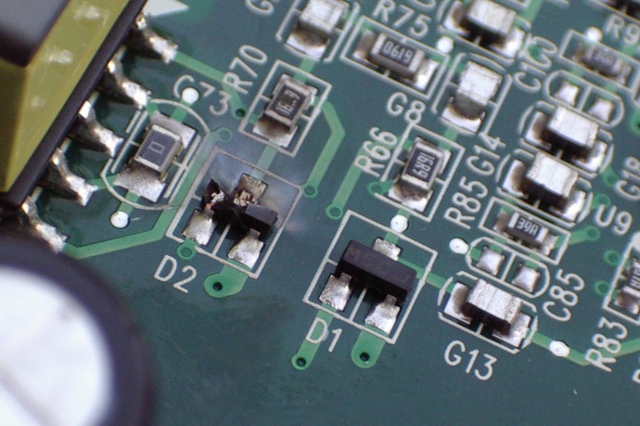 Do you rely on just one piece of technology? This piece of IT was damaged when lightning hit a neighbouring building. One random event... let us help your business to survive such events and to thrive, whether the elements or Internet based threats conspire against you or not.
-
CloudPerfect.net Demo Site
- Try the available features by clicking on any links or buttons.
- First login here or the CRM button
- After logging in click on portal button (top right) to return here
- Hover your mouse over any
button for more info.A popup like this appears when you hover your muse over the CP button. Either move your mouse off the popup box, or click if instructed to make it close.
-
Website and Intranet
- Open Website in new window
- Open Intranet in new window
- Open admin for Website - Intranet
CloudPerfect.net prefers websites which are administered using a web-interface, e.g. WordPress or Drupal. This enables users to updates their website without needing technical training. An authorised and logegd in user would click here to access the website control panel.
-
File-shares/ Backups
- Open File Server in web browser
Both the shared folders and your backups can be viewed in a web browser, allowing you to view and download any of your files from anywhere. Additionally, files can be uploaded to shared folders.
- Open backups in web browser
- Instructions for configuring file-shares/ backup
Your CloudPerfect.net stored files can also be accessed from your own computer as a 'network drive'. Full instructions on how to do this can be found within the help site or by clicking on the links here.
- Open File Server in web browser
-
Telephony/ VoIP
- Status: connected to PC: (this one).
An optional feature is computer telephony or Voice over IP (VoIP). This enables you to receive calls wherever you are, redirect calls to colleagues as if you were all sat in an office or allow homeworkers to make/ receive calls without needing a second phone line. Call us to see if this would help you.
- You have 3 new voicemails.
- Change call destination to Mobile/choose.
- Status: connected to PC: (this one).
-
Accounts
- Disabled, please contact CloudPerfect.net for access to integrated online accouting.
CloudPerfect.net includes full integration with one of the leading online accounting providers. This ensures the contact details for all of your customers are kept up-to-date, you only need to update them once - CloudPerfect.net ensures they are synchronised with your accounts, email address book and CRM contact details. Automation will generate an invoice with the accouting package as soon as orders are logged on the CRM system - no more missed/ untracked invoices.
- Disabled, please contact CloudPerfect.net for access to integrated online accouting.
-
Portal/ System Status
- Status: All working
A key part of the CloudPerfect.net system is the automated testing. It regularly checks all aspects of the system and informs us of any issues. We think it is a well engineered solution, but with self-test when it does fail we will know about it and fix it before you even see any issues.
- Support: you have 3 open tickets
- Open new ticket
All requests and issues with the CloudPerfect.net system are tracked with our support ticket system, which is part of the CRM system (if you wish to have something similar for your customers). Whether by web or by phone you can raise requests or follow the progress of any issues.
- News: no planned upgrades/ outages
- Status: All working